









Reporting Tips
This page is dedicated to providing calculated column formulae with some worked examples. You can use these in your Reports but remember, you may need to modify the formula to suit your exact needs.
| Formula | What does it do? | Use Case | Worked Example |
|---|---|---|---|
| IF( ) | Test if conditions are true or false | I want to display the value True on the rows of the report that have Activities of type “Phone Call”.
|
IF(activity_type LIKE ‘Phone Call‘, ‘True’, ‘False’) |
| CASE | Compare a value to a series of values and return a specified value | I want to a column to show “Not Started” for any Case with a Status value of Open, “Finished” if Closed and anything else: “In Progress” | CASE status_name WHEN ‘Open’ THEN ‘Not Started’ WHEN ‘ Closed’ THEN ‘Finished’ ELSE ‘In Progress’ END |
| CASE | Compare multiple values to a series of values and return a specified value | I want to show a value of Escalated for any Case with a Status of Open as well as Assigned To being “Management”, any Case with a Status of “Bug” or “Enhancement” = Requires Engineering, any Case with a Status of “Closed” = Finished. Anything else will be “In Progress”. | CASE WHEN status_name = ‘Open’ AND assigned_to_name = ‘Management’ THEN ‘Escalated’ WHEN status_name = ‘Bug’ OR status_name = ‘Enhancement’ THEN ‘Requires engineering’ WHEN ‘ Closed’ THEN ‘Finished’ ELSE ‘In Progress’ END |
| count(DISTINCT PARENT(‘Field Name’) | Count the number of unique values in a Summary report | I want to count the unique number of Opportunities in the Details report. Due to joining my Opportunities to Line Items and Activities I am seeing multiple rows for the same Opportunity reference. | count(DISTINCT PARENT(‘Opportunity Reference’)). |
| GROUP_CONCAT(column_name SEPARATOR ‘, ‘) | Summarise a column into a string | I want to show all the Campaigns that a Person is a member of, separated by a comma. | GROUP_CONCAT( campaign_membership.campaign_name SEPARATOR ‘, ‘) |
| DATEDIFF(first_column_name, second_column_name) | Calculate the difference in days between two dates | I want to show how long it has been since my Activities were created. (the difference between when it was created and today) | DATEDIFF(CURDATE(), created_at) |
Revision History
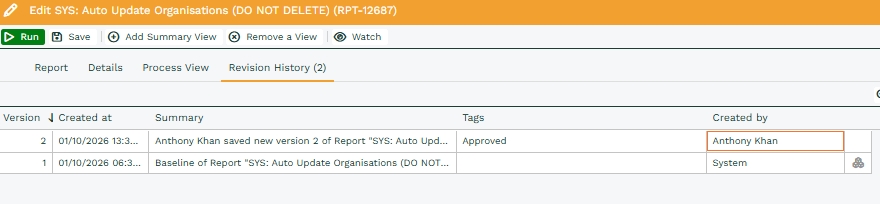
A report’s editor gains a Revision History tab, which lists each saved revision with the most recent revision shown first. Each revision shows who saved it and when.
Every revision except the most recent can be restored using Revert to this version. This is available as a row action and from the Version cell menu.
Selecting Revert to this version opens a panel showing the version being reverted to and the current version it will replace. Selecting Revert replaces the report with the selected version and records the replaced state as a new revision.
The Revision History tab is available to users with Manage Configuration Versions permission.
Reverting a Revision
- Open the report in the Report Editor.
- Open the Revision History tab.
- Locate the version you want to restore.
- Select Revert to this version.
- Review the versions shown in the confirmation panel.
- Select Revert to restore the selected version.
The previous live version is retained as a new revision, so the revert can itself be tracked in the report’s Revision History.